AI | Deep Tech | Robotics | Emerging Technologies - Independent Analysis

Showing posts with label SDRplay. Show all posts

SDRplay ADS-B

Today I have tested the ads-b plugin with the SDRplay RSPdx, Tech Minds guide is perfect and explains it step by step. In less than 15 minutes you will be receiving the aircraft data on your receiver.

You just have to have the latest version of the sdruno software, follow the instructions in the video.
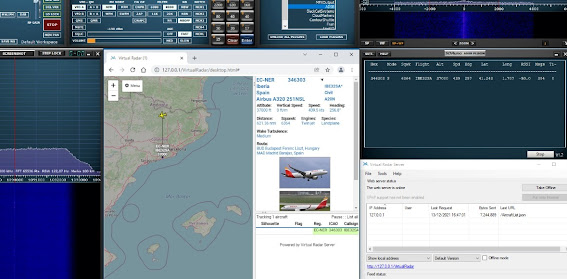
My result in number of aircraft was not very successful because the reception antenna is not adequate, but soon I will solve this problem.

Links:

  • SDRplay

https://www.sdrplay.com/softwarehome

  • ADS-B plugin

https://www.sdrplay.com/downloads

  • Virtual Radar Server

https://www.virtualradarserver.co.uk/Download.aspx


SDRUNO V1.41

SDRuno V1.41 was fully released today.  It includes the much requested full scheduler facility which allows you to set up numerous recording events for your RSP.  As well as providing all the expected calendar options (time of day, date, start and stop times, repeating options and so on), you can also set the ‘profile’ for each recording – this allows you to pre-set frequencies, bandwidths, demodulator options (AM/FM/USB/LSB etc.), choice of filters and antenna port selection.

Additionally you can choose the settings for connectivity to other third party software or the running of a specific plugin.

Source: https://www.sdrplay.com/try-out-the-new-features-in-sdruno-v1-41-released-today/

Control ShuttlePRO V.2


This is another model from the same Contour Design company, it is the ShuttlePRO V.2 model, it has more configuration options and it is also compatible with SDRuno.
For a reasonably acceptable price, both are external VFOs that work very well with SDRplay receivers.

Contour ShuttleXpress


Today I have installed a Contour Shuttlexpress, a perfect complement to sdruno sdrplay an external vfo with 5 buttons to apply various configurable functions for the SDRuno software
In my opinion, the VFO is a bit small, but it does its job, apart from that if you set the Shuttle Ring for the VFO frequency you can scan the bands automatically with a slight left or right turn with lower or higher speed.
Installation in Windows 10 is very easy, connect the device to a USB port, install the drivers, load the ContourShuttle plugin and configure it according to your preferences.

Video
https://www.youtube.com/watch?v=L7ZZAneskT8

Plugins
https://www.sdrplay.com/plugins/

Drivers
https://www.contourdesign.com/shuttle-drivers/